·9 min read
Nano Banana 2.1 vs Pro: Which AI Image Model Is Better?
Choosing between Nano Banana 2.1 and Nano Banana Pro? Both are powerful Google AI image models, but they differ in pricing, model architecture, creative capabilities, and the kinds of workflows they are designed for.
But is Nano Banana 2.1 actually better than Pro? Let's compare their capabilities, official benchmark results, pricing, and real-world image editing scenarios.
1. Nano Banana 2.1 vs Pro: Quick Comparison
Here are the key differences between the two AI image models.
| Feature | Nano Banana 2.1 | Nano Banana Pro |
|---|---|---|
| Developer | Google DeepMind | Google DeepMind |
| Model family | Gemini 3.6 Flash-based | Gemini 3 Pro Image |
| Primary focus | Efficient image generation and editing | Premium creative control |
| Image generation | Yes | Yes |
| Image-to-image editing | Yes | Yes |
| Maximum resolution | 4K | 4K |
| Reference images | Up to 14 | Up to 14 |
| Character references | Up to 4 | Up to 5 |
| High-fidelity object references | Up to 10 | Up to 6 |
| 2K image output price | $0.0504 | $0.134 |
| Best starting point | Everyday creation and editing | Complex, precision-sensitive work |
Sources: Google Gemini API documentation and standard image-output pricing, October 2026. The prices exclude input and thinking costs.
Both models can generate new images from text prompts and edit existing images using natural-language instructions.
The main difference is positioning: Nano Banana 2.1 is designed as an efficient, modern image-generation workhorse, while Nano Banana Pro targets premium workflows requiring advanced creative control.
However, a premium model does not automatically produce the better image for every prompt.
2. What Is Nano Banana 2.1?
Nano Banana 2.1 is Google's image generation and conversational image editing model, released on October 6, 2026.
Built on Gemini 3.6 Flash, it improves on Nano Banana 2 with enhanced image realism, text rendering, prompt adherence, and character consistency.
Its major capabilities include:
- Generating images at 1K, 2K, and 4K resolutions.
- Editing existing photographs using text instructions.
- Combining multiple reference images.
- Maintaining consistency across multiple editing steps.
- Generating posters, infographics, and images containing text.
- Supporting ultra-wide and vertical image compositions.
- Using Google Web and Image Search grounding where supported.
Google positions Nano Banana 2.1 as its primary high-efficiency model for image generation and editing.
For creators producing social media images, product photography, marketing graphics, and everyday photo edits, it is a strong place to start.
3. What Is Nano Banana Pro?
Nano Banana Pro is Google's Gemini 3 Pro Image model, designed for sophisticated visual generation and editing.
Its strengths include advanced creative control, world knowledge, localization, and brand consistency.
Nano Banana Pro can be particularly useful for projects involving:
- High-end commercial advertising.
- Complex visual compositions.
- Brand-sensitive product imagery.
- Detailed visual instructions.
- Multiple reference characters.
- Marketing assets requiring consistent visual identity.
However, Nano Banana Pro costs more per generated image than Nano Banana 2.1.
The practical question is whether its results are meaningfully better for your particular task.
4. Nano Banana 2.1 vs Pro: Image Quality Comparison
Image quality is one of the biggest reasons users compare these models.
Both can create photorealistic photographs, illustrations, product mockups, and edited images. The difference is not simply which produces the prettiest result.
It is also about which model follows your instructions while preserving the details you care about.
1Realistic Portraits and Character Consistency
 Nano Banana 2.1
 Nano Banana Pro
For portrait editing, evaluate whether the models preserve facial features, expression, hairstyle, skin texture, and identity.
Example prompt:
"Using the uploaded reference photo, place the same person in a softly lit outdoor café. Preserve the original facial features, age, hairstyle, and skin tone. Use realistic natural light and shallow depth of field. Do not change the person's identity."
What should you compare?
- Facial similarity to the uploaded reference.
- Skin texture and realism.
- Eye and hair details.
- Lighting consistency.
- Unrequested changes to facial features.
An independent five-task comparison published by Fuser on October 6 found that Nano Banana Pro produced the closest facial likeness in its character consistency example.
That is useful evidence, but it is not proof that Pro always performs better with portraits. The comparison used one generation per model for each task.
For character-focused projects, test both models using your own reference image before committing to one.
2Product Photography
 Nano Banana 2.1
 Nano Banana Pro
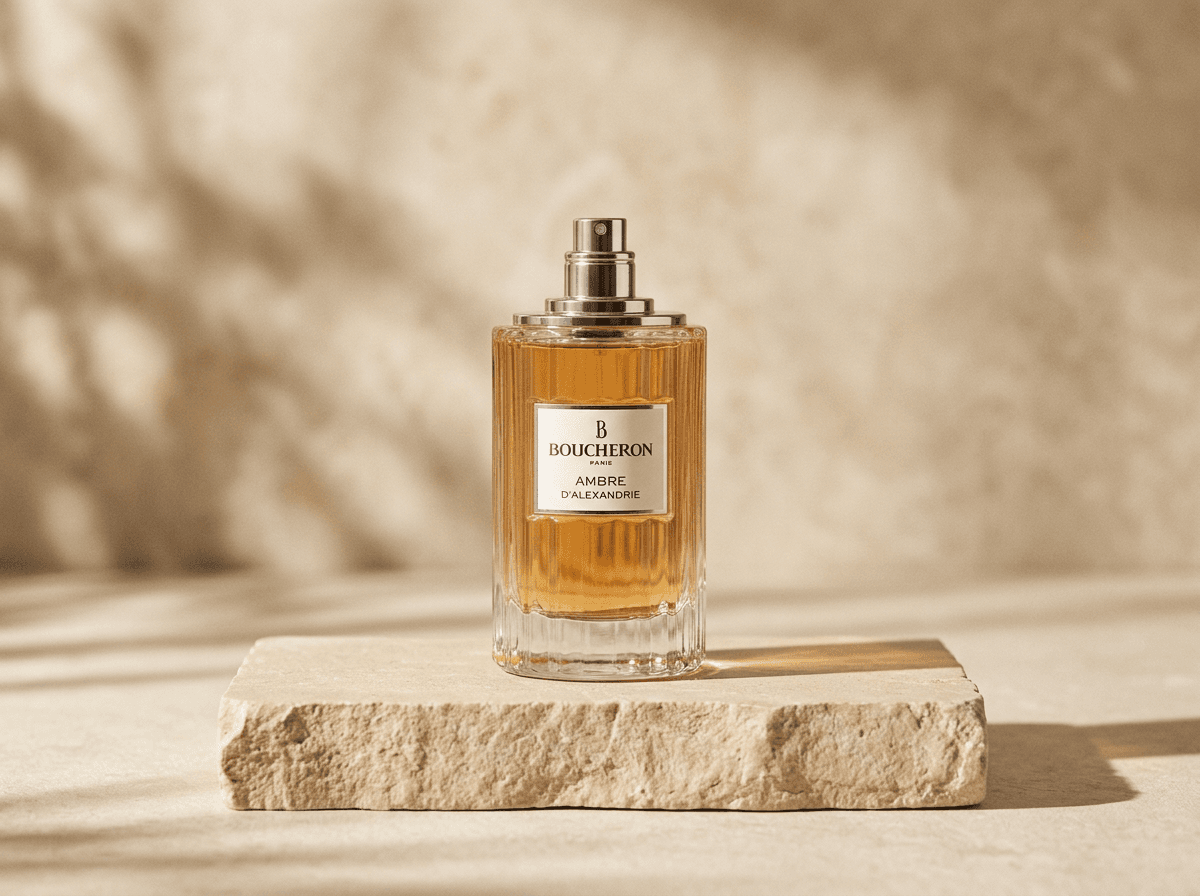
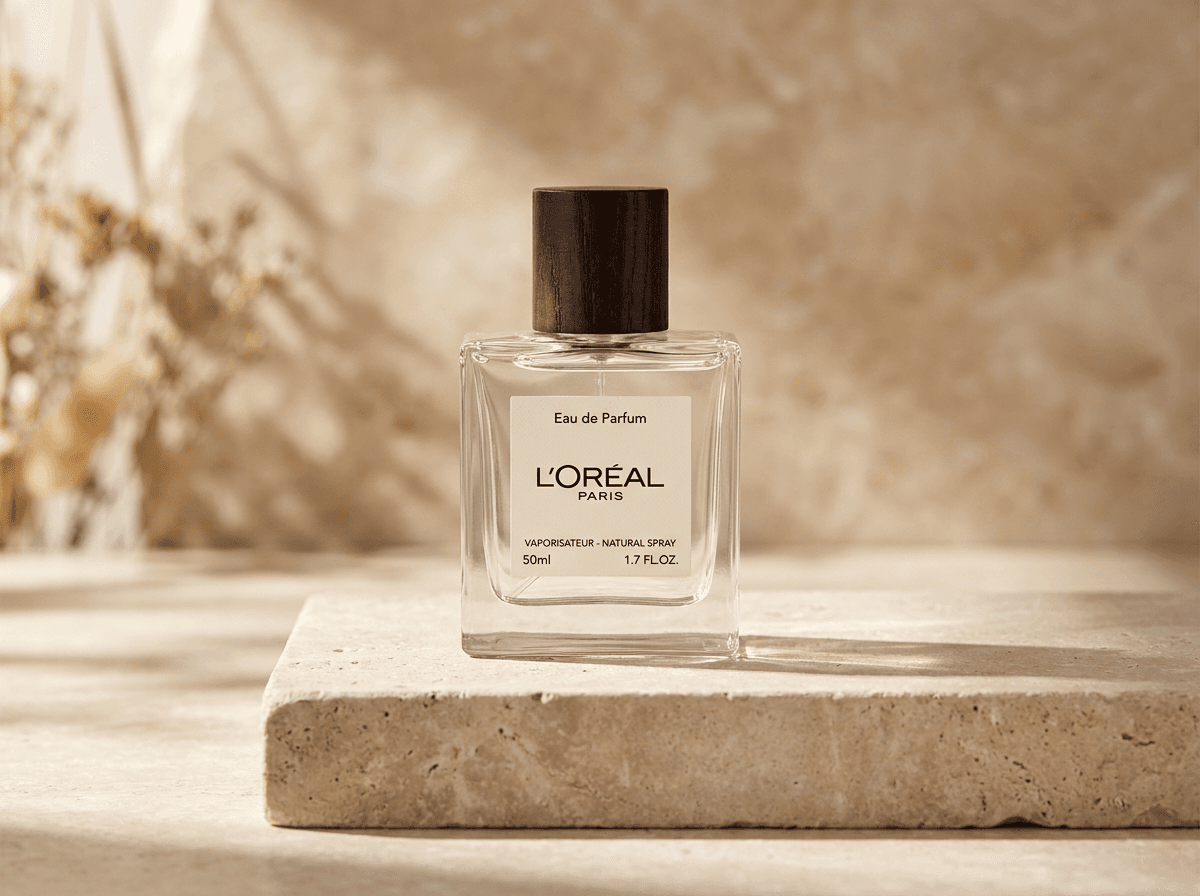
AI product photography requires more than an attractive background.
A usable commercial image must preserve the product's shape, branding, material, proportions, and other identifying details.
Example prompt:
"Create a professional commercial photograph of the uploaded perfume bottle on a beige stone pedestal. Add soft natural sunlight from the left, with shadows falling to the right. Keep the bottle shape, label, logo, and color unchanged. Use a clean luxury skincare advertising style."
What should you compare?
- Product shape and proportions.
- Logo and label accuracy.
- Realistic reflections.
- Shadow direction.
- Background composition.
In Fuser's published product photography test, Nano Banana 2.1 followed the requested lighting direction more accurately than Pro.
This illustrates why prompt adherence can be more important than visual complexity.
Our recommendation: Start with Nano Banana 2.1 for routine product mockups. Compare against Pro when packaging details, precise branding, or final advertising output require additional scrutiny.
3Text Rendering and Typography
 Nano Banana 2.1
 Nano Banana Pro
Image generators can struggle with exact wording, especially when creating posters, packaging, restaurant menus, and advertisements.
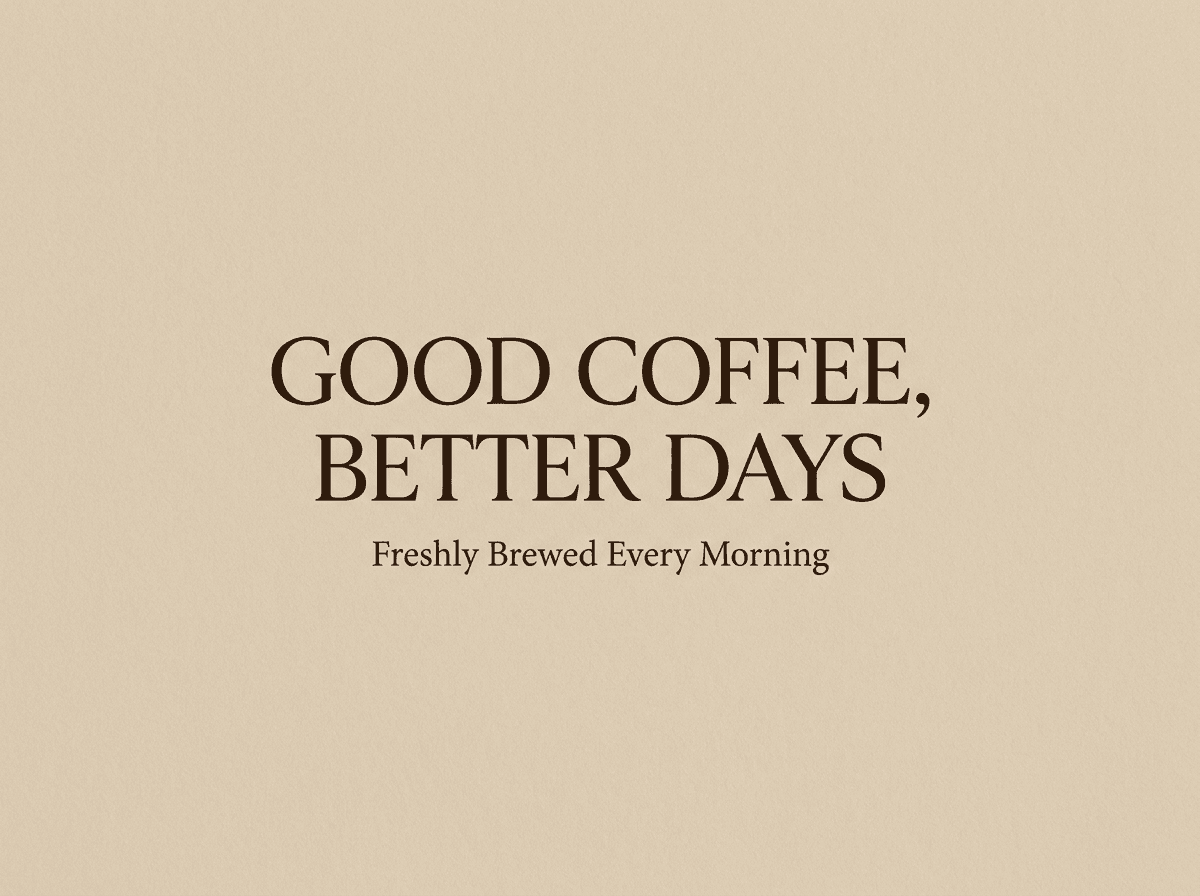
Example prompt:
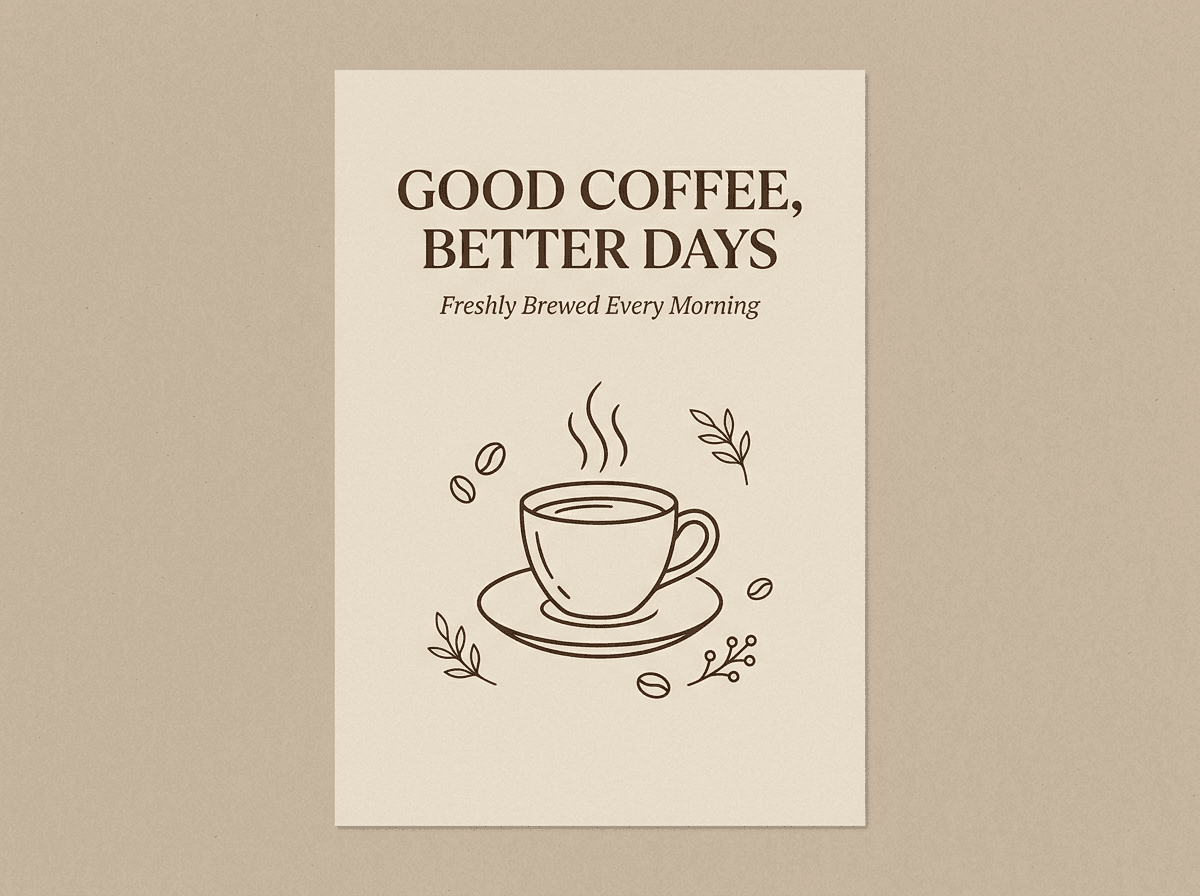
"Design a clean, print-ready coffee shop poster with the exact headline 'GOOD COFFEE, BETTER DAYS' and the subtitle 'Freshly Brewed Every Morning'. Use elegant typography, a warm beige background, and a minimalist layout. Include no additional text."
The evaluation should examine more than spelling.
Check whether:
- Every requested word is correct.
- The model adds unwanted text.
- Typography is readable.
- Letter spacing is consistent.
- The output is suitable for the intended use.
Google's official Nano Banana 2.1 documentation highlights improvements in text rendering and infographic layout.
In Fuser's independent poster test, all three tested models rendered the requested text correctly. Pro produced flat artwork suitable for printing, while Nano Banana 2.1 generated a photographed poster presentation.
Our recommendation: Use Nano Banana 2.1 for routine text-based graphics and infographics. Try Pro when the creative brief requires a particularly controlled or print-oriented result.
Neither model should be trusted to reproduce critical legal, medical, or commercial text without manual verification.
4AI Image Editing and Background Replacement
 Nano Banana 2.1
 Nano Banana Pro
Image-to-image editing is especially important for users who already have a photograph and want to change a specific part of it.
For example, you might want to replace a background without changing the person or product in the foreground.
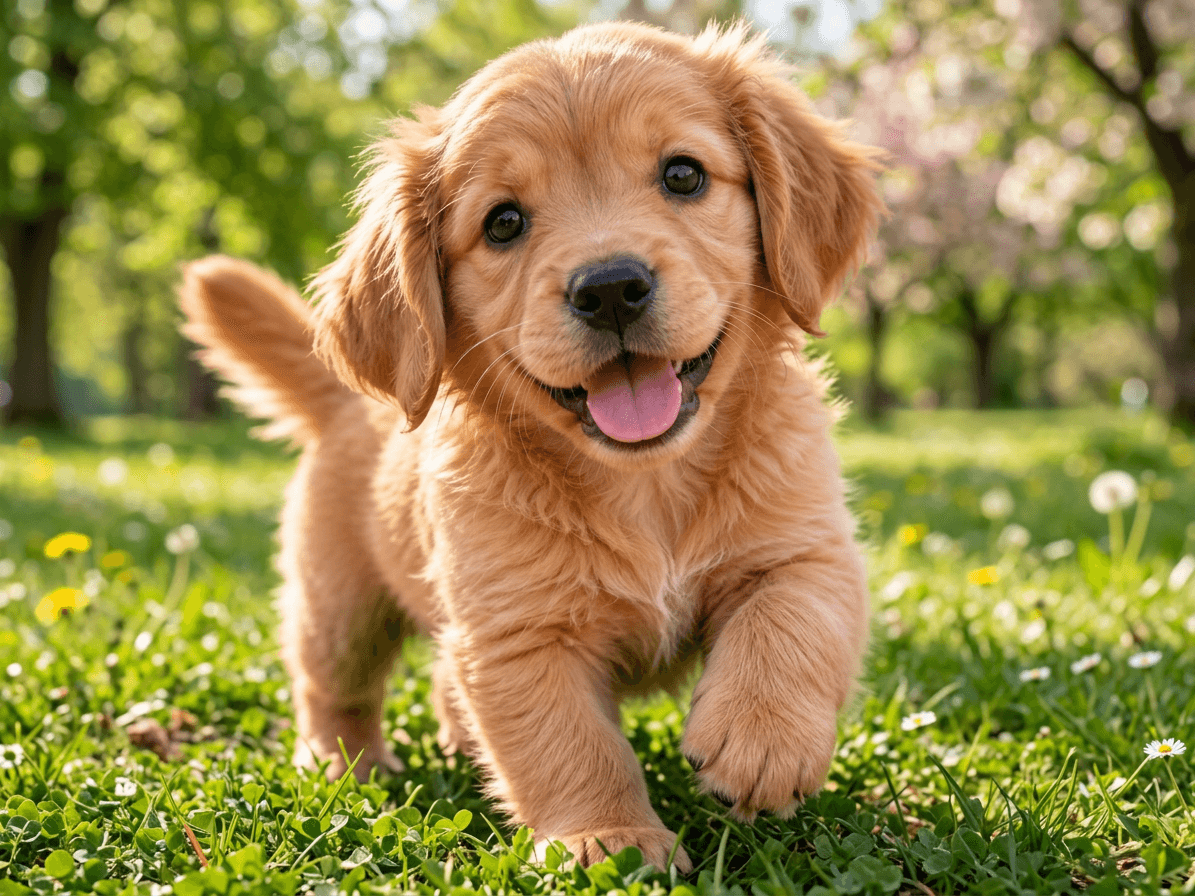
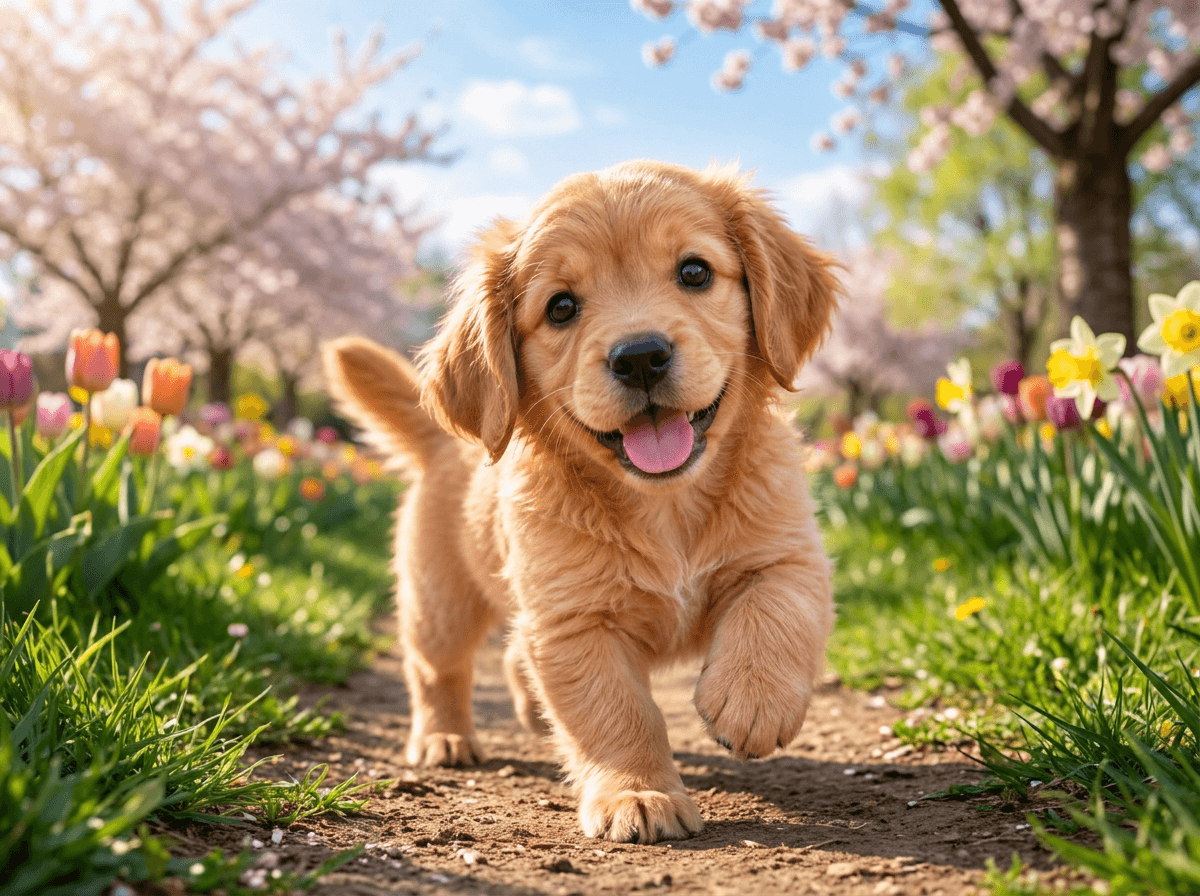
Example prompt:
"Replace the indoor living-room background in this dog photograph with a beautiful spring park. Keep the exact same dog, pose, fur color, size, and camera perspective. Change only the background. Match the lighting naturally."
A successful edit should preserve the original subject while making the requested modification.
Compare the models on subject preservation, background realism, lighting consistency, unwanted edits, and overall composition.
Google's October 2026 model card reports stronger general editing results for Nano Banana 2.1 in its internal evaluations.
However, neither model guarantees perfect preservation. Small visual elements may still change unexpectedly.
Our recommendation: Based on the visual results in this example, we recommend using Nano Banana 2.1 first for background replacement.
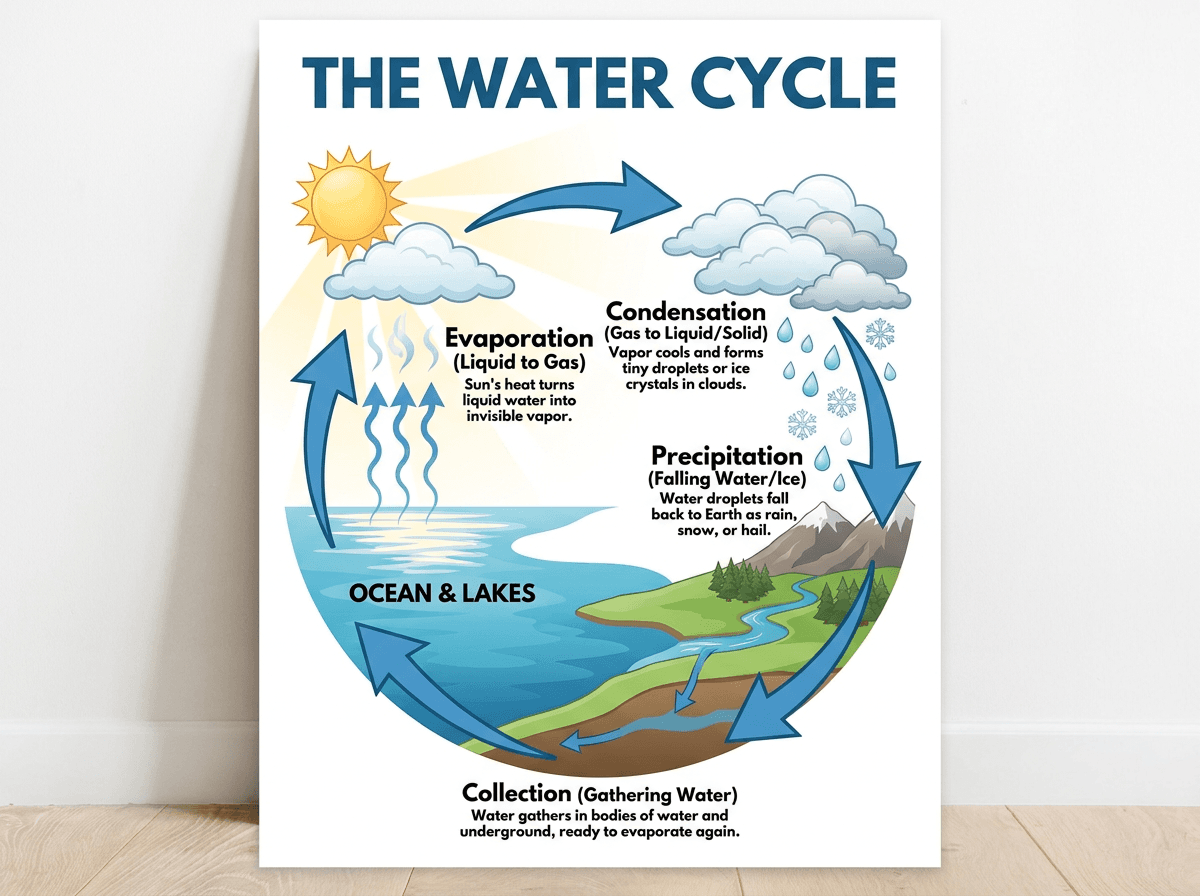
5Infographics and Complex Layouts
 Nano Banana 2.1
 Nano Banana Pro
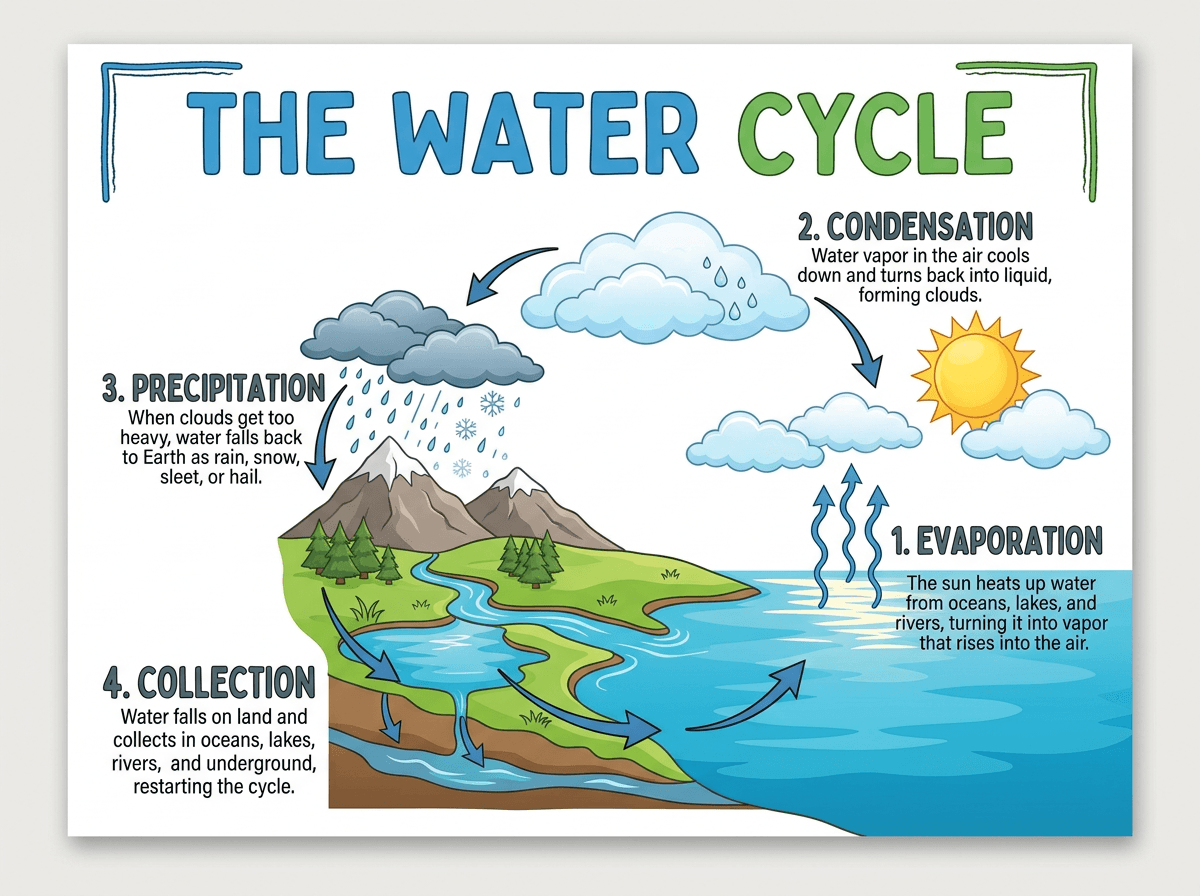
Infographics are a demanding test because they combine layout, text rendering, factual accuracy, and visual hierarchy.
Example prompt:
"Create an educational infographic explaining the water cycle. Include four clearly labeled stages: Evaporation, Condensation, Precipitation, and Collection. Use scientifically appropriate illustrations, a clean white background, and readable typography. Keep the design suitable for a classroom poster."
Google's published model evaluation gives Nano Banana 2.1 a higher infographic design score than Pro under the tested conditions.
That makes Nano Banana 2.1 a particularly interesting option for presentations, educational diagrams, and structured visual content.
Still, generated infographic facts should always be reviewed before publication.
5. What Do Google's Official Benchmarks Show?
Google DeepMind published evaluation results for Nano Banana 2.1 in October 2026.
Selected results are shown below.
| Benchmark | Nano Banana 2.1 (Thinking) | Nano Banana Pro |
|---|---|---|
| Overall text-to-image preference | 1050 | 935 |
| Infographic design | 1048 | 912 |
| General image editing | 1026 | 939 |
| Single-character consistency | 1028 | 991 |
| Multi-character consistency | 1106 | 1011 |
| Product consistency | 1024 | 965 |
Source: Google DeepMind's Nano Banana 2.1 model card. Figures are evaluation scores from the stated methodology, not percentages or guarantees of success on individual prompts.
In Google's evaluation, Nano Banana 2.1 with thinking enabled outperformed Nano Banana Pro on all six metrics listed above.
This is significant because it shows that the less expensive model is highly competitive in both image generation and editing.
But benchmarks do not replace testing with your actual photographs, prompts, and quality requirements.
6. Nano Banana 2.1 vs Pro Pricing
Pricing is another important difference between Nano Banana 2.1 and Pro.
Here are Google's published standard Gemini API image-output prices.
| Resolution | Nano Banana 2.1 | Nano Banana Pro |
|---|---|---|
| 1K | $0.0336 | $0.134 |
| 2K | $0.0504 | $0.134 |
| 4K | $0.113 | $0.240 |
Prices checked October 8, 2026. These are image-output costs, not complete API request costs. Input images, text, thinking, and other applicable charges may increase the total. Third-party image-generation platforms can charge different prices or credits.
Nano Banana 2.1 has a substantial image-output cost advantage at every listed resolution.
This matters most when you generate images frequently.
For example, an e-commerce team may need multiple product backgrounds, while a social media creator might produce dozens of visual variations before selecting a final design.
Lower per-image costs make experimentation more affordable.
However, cost alone should not determine your choice. If a model requires repeated regeneration to achieve an acceptable result, the effective cost of obtaining one usable image may be higher.
For commercial projects, consider both the generation cost and the number of successful images you actually receive.
Image output cost by resolution
Google Gemini API standard rates, USD per output image. Excludes input and thinking tokens.
7. Which Model Is Faster?
Nano Banana 2.1 is based on Google's Flash model architecture and is designed for efficient image generation.
Nano Banana Pro is positioned toward more complex, precision-oriented creative workflows.
However, Google does not publish a single universal generation time that can accurately describe every prompt, output resolution, and workload.
Actual speed can vary with:
- Resolution and aspect ratio.
- Number of reference images.
- Prompt complexity.
- Thinking settings.
- Service or provider load.
Nano Banana 2.1 supports configurable thinking levels, including minimal, medium, and high.
For a fair speed comparison, measure generation time across multiple runs using the same prompt, image dimensions, and provider.
Do not assume that a model will always finish faster based on its name or architecture alone.
8. Nano Banana 2.1 vs Pro: Which Should You Choose?
Both models are useful, but they are designed around somewhat different priorities.
Choose Nano Banana 2.1 if you:
- Want a capable all-purpose AI image generator.
- Frequently edit photos or replace backgrounds.
- Create social media images and marketing graphics.
- Produce product photography variations.
- Need high-quality results at a lower generation cost.
- Generate large numbers of images.
- Want to experiment with multiple prompts and styles.
Choose Nano Banana Pro if you:
- Have demanding creative or brand requirements.
- Need to work with five character references.
- Require advanced control over localized visual assets.
- Have a workflow where Pro consistently performs better in your own tests.
- Are comfortable paying more for a preferred result.
Our Verdict
For most everyday image generation and editing tasks, start with Nano Banana 2.1.
Its combination of competitive image quality, editing capabilities, and lower output pricing makes it a practical default.
Nano Banana Pro is still worth keeping as an alternative for projects where exact likeness, brand treatment, or another specific visual requirement matters.
The best model is ultimately the one that produces the desired result with the fewest corrections and at an acceptable cost.
9. How to Try Nano Banana 2.1 and Pro
You don't need to understand the underlying model architecture to start creating AI images.
If your image generator offers both models, follow these steps:
- Open an AI image generation or editing tool.
- Choose Nano Banana 2.1 or Nano Banana Pro from the model selector.
- Upload a reference image if you want to edit an existing photo.
- Enter a clear, specific prompt describing your desired result.
- Select your preferred output resolution.
- Generate the image and review the result.
- Switch models and use the same prompt if you want to compare outputs.
For the fairest comparison, use the same reference images, dimensions, and instructions.
You can explore supported image generation and editing models at Image to Image AI.
Whether you're changing a background, adjusting a product photo, or exploring a new artistic style, testing with your own images is the most useful way to compare models.
10. Frequently Asked Questions
1. Is Nano Banana 2.1 better than Nano Banana Pro?
Nano Banana 2.1 performs better on several benchmarks published by Google, including overall text-to-image preference, general editing, and multi-character consistency. However, Pro can still be preferable for particular image tasks. The better model depends on the prompt and desired result.
2. What is the main difference between Nano Banana 2.1 and Pro?
Nano Banana 2.1 focuses on efficient, high-quality image generation and editing using a Gemini 3.6 Flash-based architecture. Nano Banana Pro is Google's premium Gemini 3 Pro Image model, designed for demanding creative tasks and advanced visual control.
3. Is Nano Banana 2.1 cheaper than Pro?
Yes. Google's published standard image-output price for a 2K image is $0.0504 with Nano Banana 2.1 and $0.134 with Pro. Additional API charges may apply, and third-party services can set their own prices.
4. Can Nano Banana 2.1 replace Nano Banana Pro?
For many everyday image generation and editing workflows, Nano Banana 2.1 can serve as the primary model. But Pro may remain valuable for specific projects where its output better satisfies creative or brand requirements.
5. Which model is better for AI image editing?
Google's October 2026 evaluation reports higher general editing and product-consistency scores for Nano Banana 2.1. That makes it a strong default, although both models can make unintended changes to an image.
6. Which model is better for product photography?
Start with Nano Banana 2.1 for product photography, particularly when generating multiple image variations. Compare against Pro if exact product geometry, labels, or brand presentation are critical.
7. Which model is better for text in images?
Both models can generate text inside images. Google reports improved text rendering for Nano Banana 2.1, while Pro remains useful for controlled visual layouts. Always verify spelling, small print, and layout details.
8. Does Nano Banana 2.1 support 4K image generation?
Yes. Nano Banana 2.1 supports 1K, 2K, and 4K image outputs. Nano Banana Pro also supports up to 4K.
9. Which Nano Banana model is faster?
Nano Banana 2.1 is designed for efficient, Flash-class image generation. However, actual response time depends on model settings, resolution, workload, and provider conditions. Test both models under comparable conditions before drawing a firm conclusion.
10. Where can I use Nano Banana 2.1 and Nano Banana Pro?
Google offers Nano Banana models through its Gemini ecosystem and developer services. Supported third-party AI image generation tools may also provide access to one or both models. Check the model selector and current pricing before generating.
Final Thoughts
Nano Banana 2.1 vs Pro is not simply a battle between a budget model and a premium model.
Google's newer Nano Banana 2.1 offers competitive image quality, strong editing results, and substantially lower image-output costs, making it an attractive default for many creators.
Nano Banana Pro continues to offer capabilities worth considering for demanding creative work.
If you're unsure which one to use, the simplest approach is to start with Nano Banana 2.1, review your results, and compare against Pro when the project requires additional precision.
Try AI Image Generation and Editing →
References
- Google DeepMind — Nano Banana 2.1 Model Card
- Google Gemini API — Image Generation Documentation
- Google Gemini API — Pricing
- Google — Nano Banana 2.1 Model Documentation
- Fuser — Independent Same-Prompt Comparison
This article combines official model documentation with clearly attributed third-party observations.