Free Image to Image AI: What You Actually Get
Free credits, free trials, “no sign-up” — we tested what each one really means.
Free Image to Image AI Tools Compared
Observed in our accounts and on each tool’s official pages on October 22–23, 2026. Free allowances change often; check each site before you rely on them.
| Tool | Sign-up | Free credits | Free images in our test | Credits per image | Watermark on our output | Main free-tier limit |
|---|---|---|---|---|---|---|
| Image to Image AI | Required (Google or email) | 10 | 5 | 2 (GPT Image 2, 1K) | None | Higher models and resolutions use more credits |
| image-to-image.ai | Account used | 5 | 5 | 1 | None | Small allowance; paid credits via Telegram Stars |
| aiimagetoimage.io | Account used | About 8 (inferred) | About 4 | 2 | None | One image per edit; history kept one day |
| Kling AI | Required | 66 trial credits | 0 | 1 (2K) | — | Free tasks blocked when the queue is busy |
| Pollo AI | Account used | 0 on our new web account | 0 | 2 (1K) | — | Free credits offered through its app |
| ezmaker.ai | Not required | Not shown | 0 (verification failed) | Not shown | — | Cloudflare verification on every generation |
All tools were tested with the same portrait and prompt: keep the face, pose, and outfit, and move the person to a beach.
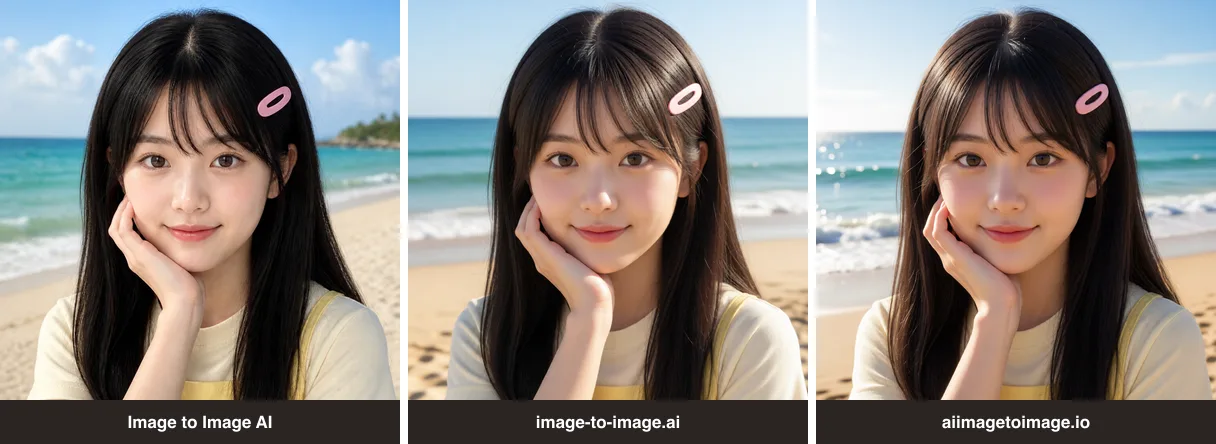
“Free” Claims vs. What We Saw
These are dated observations from our own accounts, not judgments about each company. Results may differ by account, region, or day.
“Completely Free,” but Credits Were Deducted
aiimagetoimage.io’s FAQ says the tool is completely free and needs no registration. In our signed-in account, each generation deducted 2 credits: the balance read 4 after two images and 2 after the third. The site also sells credit packs starting at $9.99 for 100 credits.
Free Credits for New Users, but 0 on Our Account
Pollo AI’s image to image page says new users get free credits. Our newly created web account showed 0 available credits, while the generate button needed 2. The only free-credit offer we saw was 20 credits for downloading its app.
66 Trial Credits, but the Free Queue Was Busy
Kling AI gave our account a 66-credit trial package, and an image cost 1 credit. Every submission was rejected for non-members because the system was busy: four times on October 22 (13:46–14:04 UTC) and again on October 23 at 13:28 UTC. No credits were charged.

“No Sign-Up,” but Verification on Every Generation
ezmaker.ai let us upload a photo and press Generate without an account, as its title promises. Each generation then showed a Cloudflare “verify you are human” check. In our test browser the check failed (Turnstile error 600010) and no image was produced. This may be specific to our browser setup, so treat it as unconfirmed rather than broken.
How Many Free Images You Really Get
Free credits only matter once you divide them by the cost per image.
| Tool | Free credits | Credits per image | Free images |
|---|---|---|---|
| Image to Image AI | 10 | 2 (GPT Image 2, 1K) | 5 |
| image-to-image.ai | 5 | 1 | 5 |
| aiimagetoimage.io | About 8 | 2 | About 4 |
| Kling AI | 66 | 1 | 0 in our test (queue blocked) |
| Pollo AI | 0 | 2 | 0 |
On Image to Image AI, the free count drops if you pick a higher model or resolution. Nano Banana 2.1 at 1K costs 10 credits, so 10 free credits cover one image; see the model and credit table. Each extra reference image adds 2 credits.
Is There a Free Image to Image AI Without Sign-Up?
Not one we could confirm. Two tools advertise it — aiimagetoimage.io (“no registration”) and ezmaker.ai (“No Sign-up”) — but we only produced images on aiimagetoimage.io while signed in, and ezmaker.ai stopped at verification in our test browser.
Image to Image AI is not a no-sign-up tool either: you sign up with Google or email to get 10 free credits and keep your creations in your account. If avoiding an account matters more than results, try a no-sign-up tool in your own browser and expect a verification step.
Watermarks and Commercial Use on Free Plans
| Tool | Watermark on our free output | What the tool says about commercial use |
|---|---|---|
| Image to Image AI | None | Commercial use listed on paid plans |
| image-to-image.ai | None | Homepage says images are ready for personal and commercial use; its terms do not address generated images |
| aiimagetoimage.io | None | FAQ says personal and commercial use is allowed |
| Kling AI | Not tested | Commercial use and watermark removal listed for paid plans |
| Pollo AI | Not tested | FAQ says watermark-free images and commercial rights come with paid plans |
| ezmaker.ai | Not tested | FAQ says generated images can be used commercially if your uploads do not infringe copyright |
A missing watermark is not the same as a commercial license. Before using a free result in ads, products, or client work, read the tool’s terms, and only upload images you own or have permission to use.
How to Get the Most Out of Free Credits
- Start with the cheapest option. On Image to Image AI, GPT Image 2 at 1K uses 2 credits, so 10 free credits cover 5 images.
- Upload only the images you need. Extra reference images cost extra credits on most tools.
- Check the generate button before you click. Image to Image AI shows the exact cost, for example “Generate image · 2 credits.”
- Write the prompt once, clearly. Say what to keep and what to change; our guide to image to image prompts has 20 templates.
- Compare before you pay. If a free result is close, refine the prompt instead of switching to a pricier model. For a full comparison of quality and paid plans, see Best Image to Image AI Generators.
Frequently Asked Questions
1. Is there a free image to image AI generator?
Yes, but most are free for a few images, not unlimited. In our October 2026 test, Image to Image AI, image-to-image.ai, and aiimagetoimage.io produced 4–5 free images each with a signed-in account. We could not get an image from any tool without signing in.
2. Can I use image to image AI for free without signing up?
We could not confirm it. ezmaker.ai let us submit without an account, but every generation required a Cloudflare verification that failed in our test browser, so no image was produced. Image to Image AI requires sign-up with Google or email.
3. How many free images can I make with image to image AI?
In our test: 5 on Image to Image AI (10 credits, 2 per GPT Image 2 image at 1K), 5 on image-to-image.ai (5 credits, 1 per image), and about 4 on aiimagetoimage.io (about 8 credits, 2 per image). Kling AI’s 66 trial credits could not be used because free tasks were blocked.
4. Do free image to image AI tools add a watermark?
The free outputs we got from Image to Image AI, image-to-image.ai, and aiimagetoimage.io had no visible watermark. Kling AI and Pollo AI list watermark removal on paid plans only.
5. Can I use free image to image AI results commercially?
It depends on each tool’s terms. aiimagetoimage.io and ezmaker.ai say generated images can be used commercially; Kling AI and Pollo AI list commercial use on paid plans only. Image to Image AI lists commercial use on its paid plans. Check the terms before using results in ads or products.
6. Which free image to image AI supports multiple images?
Image to Image AI and image-to-image.ai both accepted two reference images on free credits in our test. image-to-image.ai charged 1 credit for a two-image edit; Image to Image AI charged 4 credits.
7. How do I get the most out of free image to image AI credits?
Use the lowest-cost model and resolution, upload only the reference images you need, check the credit cost on the generate button, and write a clear prompt that says what to keep and what to change so you need fewer retries.