Best Image to Image AI Generators in 2026, Tested
Same photos. Same prompts. Five tools. Here is what actually worked.
Image to Image AI Tools Compared
Observed in our accounts and on each tool’s official pricing page on October 22, 2026. Prices and free allowances change often; check each site before you buy.
| Tool | Default image model | Reference images | Free use in our test | Credits per image (default) | Entry price (official) | Payment |
|---|---|---|---|---|---|---|
| Image to Image AI | GPT Image 2 (5 models) | Up to 5 | 10 credits after sign-up; worked | 2 at 1K, +2 per extra image | $19.99/mo for 200 credits, or $25.99 for 200 one-time | PayPal |
| image-to-image.ai | Basic 1.0 (2 models) | Up to 5 | 5 credits; worked | 1, including with 2 images | $9.99 for 100 credits, one-time | Telegram Stars |
| aiimagetoimage.io | Standard (2 models) | 1 | Worked; no cost shown on the button | Not shown | $9.99 for 100 credits, one-time | Telegram or crypto |
| Kling AI | Kling Image 3.0 | 1–10 | 66 trial credits; tasks blocked 4 times | 1 at 2K | $6.99 first month, then $8.80/mo for 660 credits | Subscription |
| Pollo AI | Pollo Image 2.0 | Supported | 0 credits on web; not tested | 2 at 1K | Shown in local currency | Subscription |
How We Tested
- Date: October 22, 2026. Each tool was used through a signed-in account in a desktop browser.
- Tasks: keep a face and change the background; turn a product photo into an ad; combine a portrait and a handbag into one photo.
- Inputs: the same source images and the same English prompt for every tool. We kept each tool’s default model and resolution and asked for 1 output.
- Our own tool: Image to Image AI was run through its GPT Image 2 API with the same settings as the website’s defaults (1K, original ratio).
- Timing: we do not rank speed. Our tool was timed at the API, while the others were timed in the browser, so the numbers are not comparable.
- Not included: Adobe Firefly. Our test account showed a “no access” message, so we could not run it.
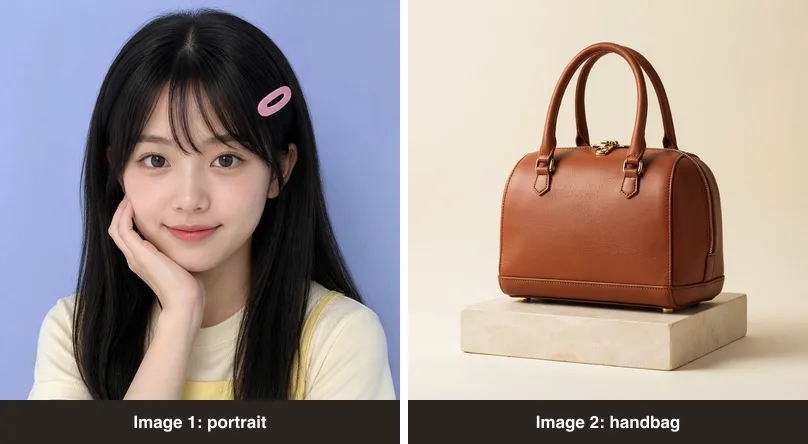
Test Results: Same Photos, Same Prompts
Test 1: Keep the Face, Change the Background
Prompt: “Keep the same face, expression, hairstyle, pink hair clip, pose, and outfit. Change the background to a sunny beach with soft ocean waves. Match the lighting on the person to the new scene. Photorealistic.”
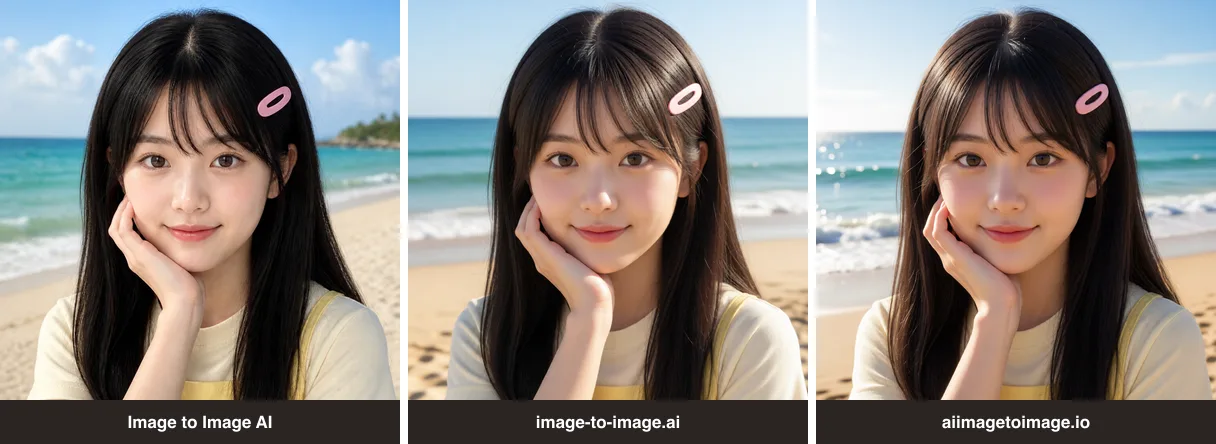
All three tools kept the face, pose, pink hair clip, cream T-shirt, and yellow straps. Image to Image AI kept the hair closest to the source’s black color; the other two made it slightly brown with warmer light. image-to-image.ai and aiimagetoimage.io returned nearly identical images at the same 992 × 992 size.
Test 2: Product Photo to Ad Image
Prompt: “Keep the exact handbag shape, color, stitching, and hardware unchanged. Place it on a marble table in a bright, upscale boutique with soft natural window light. Premium commercial product photography. Do not add logos or text.”
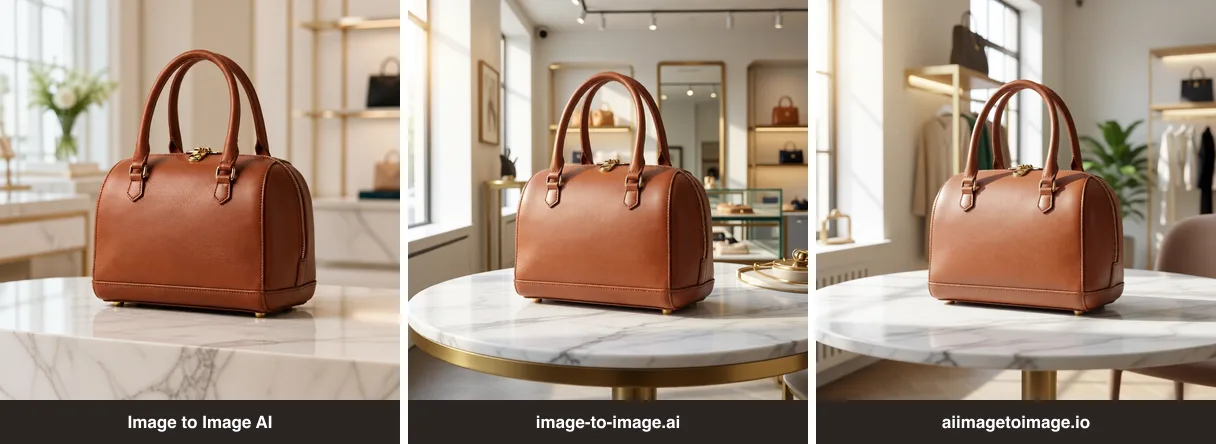
All three kept the bag’s shape, handles, stitching, and zipper hardware. Image to Image AI kept the leather grain closest to the original and framed the bag larger; the other two showed more of the boutique and rendered the leather smoother.
Test 3: Combine Two Images
Prompt: “Use image 1 for the person and image 2 for the handbag. Keep the person’s face, hairstyle, pink hair clip, and outfit from image 1, and the exact handbag shape, color, and hardware from image 2. Show her holding the handbag on a sunny city street. Realistic photo, natural light.”
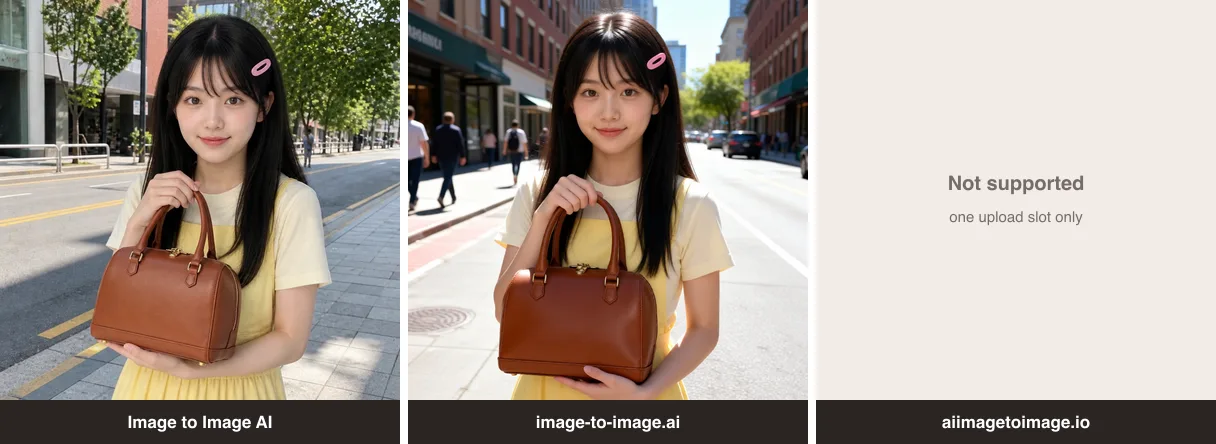
Both tools that support multiple images kept the person and the bag recognizable and produced a similar pose. The difference was cost: image-to-image.ai charged 1 credit, while Image to Image AI charged 4 credits (2 for GPT Image 2 at 1K plus 2 for the second image).
5 Image to Image AI Tools Reviewed
Image to Image AI
Image to Image AI is our own image to image AI generator. You upload up to 5 JPG, PNG, or WEBP images (10 MB each), describe the change, and choose from GPT Image 2, Nano Banana 2, Nano Banana 2.1, Nano Banana PRO, or Ideogram 4.5.
- What we saw: results on par with the other working tools, with the closest match to the source hair color and leather texture.
- Strengths: the widest model choice in this test, credit cost shown on the generate button, PayPal checkout, and failed generations refund credits.
- Weaknesses: the highest cost per image among the one-time packs we compared; extra reference images add 2 credits each.
- Best for: people who want to switch models for different jobs, such as Ideogram 4.5 for text or Nano Banana for general edits. See the model and credit table.
image-to-image.ai
image-to-image.ai is an image to image editor with Basic 1.0 and Creative 2.0 models, up to 5 images per edit, and 1K, 2K, or 4K output.
- What we saw: 5 credits on our new account; each of our three generations cost 1 credit, including the two-image edit.
- Strengths: low cost per image ($9.99 for 100 credits), credits that never expire, multi-image support.
- Weaknesses: payment through Telegram Stars only, and purchases are non-refundable according to its pricing page.
- Best for: budget multi-image editing if Telegram payment works for you.
aiimagetoimage.io
aiimagetoimage.io offers a single-image editor with Standard and nano-banana models.
- What we saw: results in about 14–20 seconds in our browser and no cost shown on the button. Our balance showed 4 credits after two generations.
- Strengths: simple interface and quick single-image edits.
- Weaknesses: one upload slot, so no multi-image edits; the page says history images are kept for one day; payment by Telegram or crypto.
- Best for: quick, one-off edits of a single photo.
Kling AI
Kling AI is best known for video, and its image tool uses Kling Image 3.0 with 1–10 reference images.
- What we saw: our account had 66 trial credits, and the generate button showed 1 credit per image at 2K. Every submission between 13:46 and 14:04 UTC was rejected with a busy-queue message for non-members. No credits were charged.
- Strengths: low cost per credit on paid plans and a full video toolset.
- Weaknesses: free-tier image tasks can be blocked at busy times; commercial use and watermark removal are listed only on paid plans.
- Best for: creators who already pay for Kling video and want images in the same place.

Pollo AI
Pollo AI is a creative suite for video and images. Its image tool defaults to Pollo Image 2.0 and lists other models such as Seedream and GPT Image.
- What we saw: our new web account showed 0 available credits, and the generate button needed 2 credits. A 20-credit offer was tied to downloading its app, so we did not generate an image.
- Strengths: a broad set of models and templates beyond image to image.
- Weaknesses: no free web credits on our new account; prices were shown in local currency, so check its pricing page.
- Best for: teams that want one subscription for video, images, and templates.
How to Choose an Image to Image AI Tool
- You edit one photo at a time: any of the three working tools will do; aiimagetoimage.io has the simplest single-photo editor.
- You combine several images: use a tool that accepts multiple references. image-to-image.ai is cheapest per edit; Image to Image AI lets you choose the model.
- You need different models for different jobs: Image to Image AI offers five, including Ideogram 4.5 for text-heavy images.
- You also make videos: Kling AI or Pollo AI, ideally on a paid plan.
- Your payment method matters: Image to Image AI uses PayPal; image-to-image.ai and aiimagetoimage.io use Telegram (and crypto for aiimagetoimage.io).
Whichever tool you pick, the prompt matters as much as the model. Our guide to image to image prompts has 20 templates you can copy.
Frequently Asked Questions
1. What is the best image to image AI generator?
It depends on what you need. In our October 2026 test, Image to Image AI, image-to-image.ai, and aiimagetoimage.io produced similar quality on single-image edits. Choose Image to Image AI for the widest model choice, image-to-image.ai for the lowest cost on multi-image edits, and aiimagetoimage.io for quick single-image edits.
2. Which image to image AI supports multiple reference images?
Image to Image AI and image-to-image.ai both accept up to 5 images, and Kling AI’s image tool accepts 1–10 references. aiimagetoimage.io accepted only one image in our test.
3. Which image to image AI tools worked on free credits?
In our test, Image to Image AI (10 credits after sign-up), image-to-image.ai (5 credits), and aiimagetoimage.io produced images without payment. Kling AI blocked free-tier submissions four times because its free queue was busy, and our new Pollo AI account had 0 credits on the web.
4. Do image to image AI tools keep the same face?
All three tools that generated images kept the face, pose, hair clip, and outfit when the prompt named them. Name the details you want to keep; results are not guaranteed on every generation.
5. Which image to image AI has the most models?
Among the tools we tested, Image to Image AI lists 5 image models for image to image: GPT Image 2, Nano Banana 2, Nano Banana 2.1, Nano Banana PRO, and Ideogram 4.5. image-to-image.ai offers Basic 1.0 and Creative 2.0, and aiimagetoimage.io offers Standard and nano-banana.
6. Which image to image AI is the cheapest per image?
Based on official prices on October 22, 2026, Kling AI’s subscriptions had the lowest cost per credit (from $1.06 per 100 credits on Standard), and its default image used 1 credit, but free-tier tasks were blocked in our test. Among one-time packs, image-to-image.ai cost about $0.10 per image at its default model, versus about $0.26 for GPT Image 2 at 1K on Image to Image AI.
7. Is Image to Image AI one of the tools in this test?
Yes. We built Image to Image AI, so we ran it with the same images, prompts, and default settings as the other tools and reported where it did not come out ahead.